Introduction
Walk into any supermarket and you're surrounded by displays competing for your attention — floor stands mid-aisle, endcap fixtures at the corner, compact units next to the till. Retailers and brand managers make decisions about all of these constantly, yet the terms used to describe them — POP and POS — are routinely swapped, misused, or treated as synonyms.
POP (Point of Purchase) covers any display that influences a buying decision across the store floor. POS (Point of Sale) refers specifically to the checkout zone — the final opportunity to add something to a basket before payment. They're not interchangeable, and mixing them up leads to misplaced fixtures, wasted budget, and missed sales.
POPAI's 2014 Mass Merchant Shopper Engagement Study found that 82% of purchase decisions are made in-store, with 62% being unplanned. That's an enormous window of influence — but only if displays are placed where shoppers are still deciding.
This article breaks down what POP and POS actually mean, where each one belongs on the store floor, and how getting the distinction right translates to better fixture placement and stronger sales.
Key Takeaways
- POP displays are placed throughout the store — aisles, endcaps, entrances — to influence purchase decisions while shoppers are still browsing
- POS displays sit at or near the checkout to trigger impulse buys just before payment
- POP suits larger products, new launches, and considered purchases
- POS suits small, low-cost, grab-and-go items
- Using both together covers the full shopper journey, from awareness through to conversion
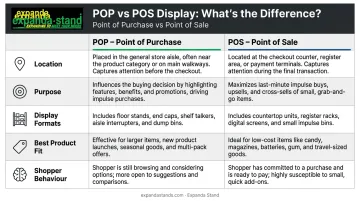
POP vs POS: Quick Comparison
| Dimension | POP (Point of Purchase) | POS (Point of Sale) |
|---|---|---|
| Location | Aisles, endcaps, store entrances, high-traffic floor zones | At or immediately adjacent to the checkout counter |
| Purpose | Influence purchase decisions; drive brand discovery | Capture impulse buys; maximise checkout dwell time |
| Display Format | Floor stands, dump bins, pallet displays, endcap shelving, gondola units | Counter display units, PDQ trays, cashier gondolas, till-side signage |
| Best Product Fit | Larger packs, multi-SKU combinations, seasonal or promotional items | Small, lightweight, low-priced items (candy, batteries, travel toiletries) |
| Shopper Behaviour | Considered decision-making — comparing, evaluating, choosing | Spontaneous — grabbing without deliberation |
What Is a POP Display?
POP, in the merchandising sense, means any display positioned where a shopper is still forming or changing a purchase decision. That's the entire store floor — not just the area near the register.
The definition matters because it frames POP as the shopper's decision zone. Displays placed here intercept browsers, communicate product benefits, and give shoppers a reason to choose one brand over another. The influence happens before the decision is final.
Common POP Display Formats
- Floor stands and freestanding display units — placed in high-traffic aisles or open floor areas for maximum visibility
- Endcap displays — positioned at aisle ends, among the highest-performing locations in any store
- Dump bins — open containers for bulk, value, or promotional products that invite handling
- Pallet and half-pallet displays — large-format, high-volume fixtures for seasonal pushes or new launches
- Gondola shelving — the backbone of most supermarket and hypermarket layouts, used for organised category display
- Shelf talkers and in-line signage — smaller interruption devices that direct attention within an aisle without requiring a full fixture
Of these, endcap placement has the strongest documented performance data. A 2018 peer-reviewed supermarket study reported average sales uplift of 416% for rear endcaps and 346% for front endcaps. Results vary by category, store format, and retail context — including modern trade formats common in India — so these figures indicate potential rather than guaranteed outcomes.
Where POP Displays Fit in a Retail Strategy
POP displays do the heavy lifting for brand managers who need more than just a home shelf position. Typical use cases include:
- Launching a new SKU in a high-visibility zone before it earns shelf space
- Running a seasonal or promotional campaign with larger display footprints
- Creating secondary facings away from the main category aisle
- Driving brand switching among shoppers still in browse mode
The physical quality of the fixture matters beyond aesthetics. A bent, faded, or structurally compromised display signals poor brand investment to shoppers — the opposite of what these placements are meant to achieve. For retailers and brand managers running long-term deployments in supermarkets, hypermarkets, or pharmacies, fixture durability is a practical requirement, not a premium option. Expanda Stand manufactures powder-coated steel display stands — including gondola shelving, endcap units, floor stands, and dump bins — under ISO 9001:2015 certified quality controls, specifically for permanent or extended in-store use.
What Is a POS Display?
POS in the display context means the physical merchandising zone at or immediately next to the checkout — not payment software or card terminals. For fixture and merchandising strategy, POS means one thing: the transaction zone.
By the time a shopper reaches the checkout, the major decisions are done. They're in completion mode. POS displays work with that psychology, not against it — presenting items that require almost no deliberation and very little financial commitment.
Common POS Display Formats
- PDQ (Products Displayed Quickly) trays — pre-loaded, shelf-ready units placed directly on or near the counter
- Counter display units — compact structures sitting on the checkout surface for maximum proximity
- Cashier gondolas — freestanding fixtures positioned in the checkout queue or adjacent to the till
- Gravity-feed dispensers — self-replenishing units for confectionery, batteries, and similar high-turnover items
- Till-side signage — promotional messaging displayed at eye level for queuing shoppers
What Products Work at POS
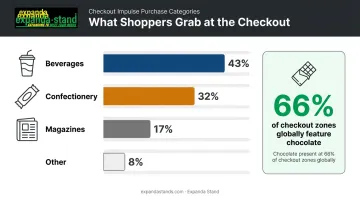
Progressive Grocer's front-end analysis found that the dominant checkout impulse categories are beverages (43%), confectionery (32%), and magazines (17%) of front-end impulse sales. A supermarket audit of international checkout zones confirmed chocolate appeared at a median 66% of checkout zones and soft drinks at 43% — categories chosen deliberately because they require almost no purchase consideration.
These numbers hold — until the checkout format changes. Mars/Wrigley's Transaction Zone Vision research found that impulse sales can fall 30–40% when shoppers use self-checkout rather than staffed lanes. The implication: fixture placement and product selection must reflect how shoppers actually move through the checkout, not just where counter space is available.
Best POS display practices:
- Keep messaging short — "Grab and Go" or "Special Offer" is enough
- Feature items under ₹200–₹500 that don't need comparison or research
- Avoid fixtures that disrupt checkout flow or block counter space
- Use bold, high-contrast graphics to cut through a visually busy environment
POP vs POS: Which Should You Choose?
Neither is universally superior. The right choice comes down to the product, the campaign objective, and where in the shopper journey you need to intervene.
Choose POP When:
- The product is launching and needs shopper education before it earns consideration
- The item is too large, heavy, or high-priced for a spontaneous checkout grab
- The campaign is seasonal and requires a substantial display footprint
- You're targeting high-traffic floor zones in supermarkets or hypermarkets
- The goal is brand discovery, category switching, or promotional depth
Choose POS When:
- The product is small, lightweight, and low-priced
- The purchase requires minimal deliberation — confectionery, gum, batteries, travel-size items
- You want guaranteed exposure to every paying shopper
- Floor space is limited or the retailer's planogram doesn't accommodate additional POP fixtures
- The objective is basket lift at the very last moment
Why Many Retailers Use Both
A well-coordinated strategy uses POP to build awareness and consideration throughout the shop, then relies on POS to capture the shopper who didn't commit mid-aisle — two roles that reinforce each other rather than compete.
A 2022 Journal of Retailing study found that optimising display type allocation across store zones can generate a revenue increase of 11.15% — not from more displays, but from the right display in the right zone. The implication is practical: the fixture decision is a placement decision first.
Expanda Stand manufactures fixtures for both zones — floor stands, endcap units, and gondola systems for mid-store POP deployment, alongside cashier gondolas and display counters for checkout-area POS placement. Retailers who need durable, permanently installed solutions across both touchpoints can source the full range from a single manufacturer.
Conclusion
POP and POS occupy different parts of the shopper journey and serve different strategic purposes. POP works when the shopper is still deciding — it creates awareness, drives trial, and builds brand presence across the store floor. POS works when the shopper is almost done — it adds low-friction, high-margin items to a basket that's already heading to checkout.
The practical approach is to use both, measure them separately, and choose placements based on product type, purchase complexity, and campaign objective. A gondola end-cap near the entrance serves a different function than a countertop impulse unit at the till — and the fixture holding each display determines whether the execution actually delivers.
Retailers who get this right treat POP and POS as complementary tools, not interchangeable ones. Investing in purpose-built fixtures for each zone — from floor-standing display units to checkout counter stands — is what turns a sound strategy into measurable sales lift.
Frequently Asked Questions
What is the difference between POP and POS material?
POP material refers to display fixtures and signage placed across the store floor to influence purchase decisions mid-browse. POS material refers to compact displays and signage positioned at the checkout to trigger last-minute impulse buys. Both serve in-store merchandising goals, but each targets shoppers at a different stage of their visit.
What are examples of POP displays in retail?
Common POP displays include endcap displays, freestanding floor stands, dump bins, pallet displays, gondola shelving, and shelf talkers. These are typically placed in aisles, store entrances, and high-traffic floor zones where shoppers are still in decision-making mode.
What products are best suited for POS displays?
POS displays work best for small, lightweight, low-priced items that need minimal consideration — candy, gum, batteries, travel-size toiletries, lip balm, and small accessories. Shoppers in the checkout queue are most receptive to quick, unplanned adds under a low price threshold.
Can a retailer use both POP and POS displays at the same time?
Using both is not only possible but often recommended. POP builds awareness and drives considered purchases throughout the store, while POS captures impulse revenue at checkout.
Where are POP displays typically placed in a store?
POP displays are placed in high-traffic areas across the store floor — aisle ends (endcaps), aisle midpoints, store entrances, and near complementary product categories. Anywhere the shopper is still browsing or comparing products is a viable POP placement zone.
What makes a POP display effective?
Effective POP displays are visually bold, positioned near relevant products, and carry clear benefit-led or promotional messaging. The fixture should also be durable enough to hold its appearance over time, since a worn or damaged display works against the brand it's meant to represent.